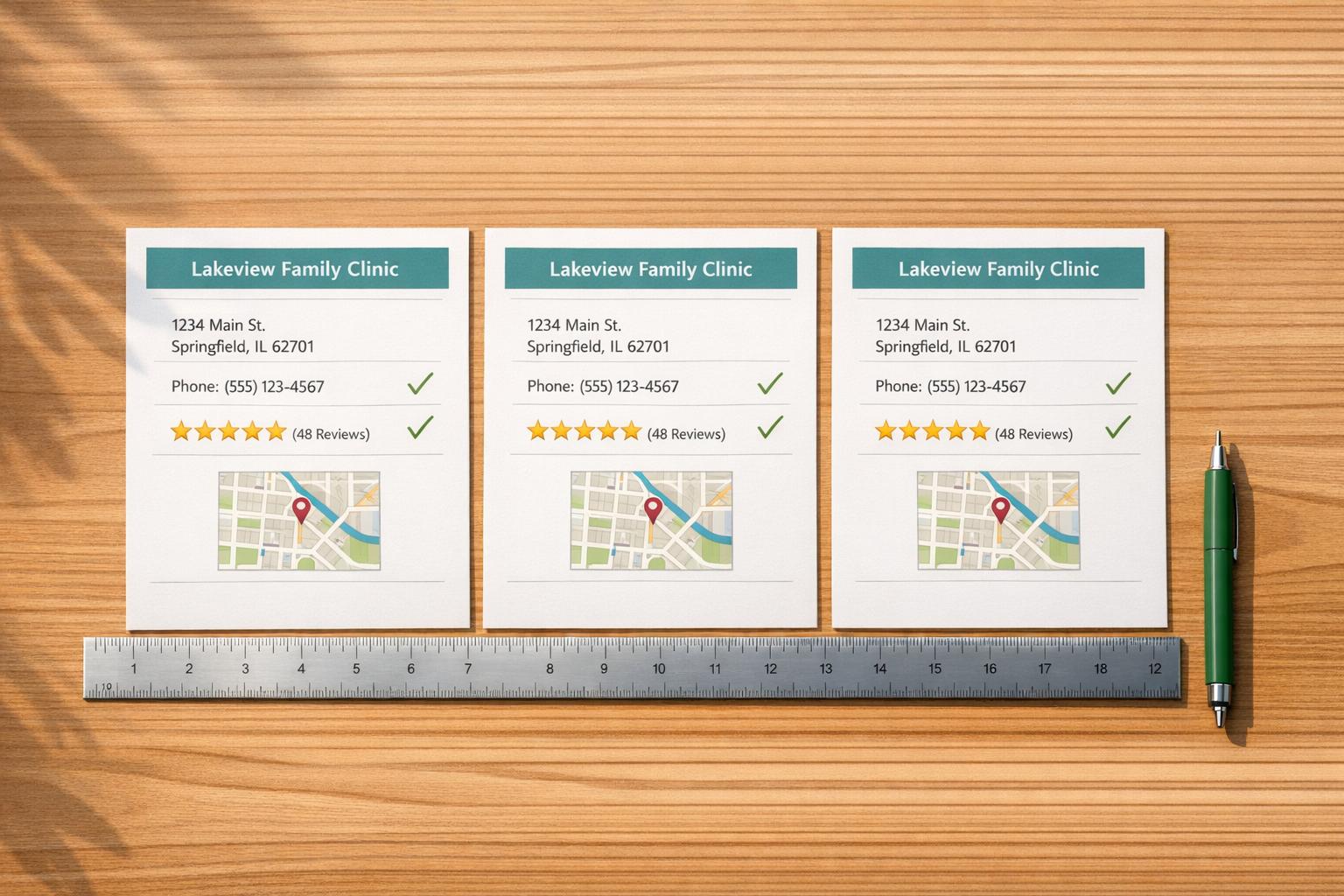
When patients search for healthcare providers online, your directory listings can make or break their decision. Here’s why optimizing your profiles matters and how to do it effectively:
- Visibility: 46% of Google searches focus on local information, and 88% of localized mobile searches lead to an action within 24 hours.
- Accuracy: 64% of patients will switch providers if they encounter incorrect or missing information.
- Engagement: Complete profiles with accurate NAP (Name, Address, Phone) details and photos get 5x more views and 186% more website clicks.
Key Steps to Optimize:
- Claim and Verify Listings: Secure profiles on Google, Yelp, Healthgrades, and other platforms to control your practice’s information.
- Ensure NAP Consistency: Keep your Name, Address, and Phone number identical across all directories to boost local search rankings.
- Complete All Profile Sections: Add services, specialties, hours, photos, and videos to build trust and attract patients.
- Use Local Keywords: Incorporate geographic terms and services into your descriptions for better search alignment.
- Manage Reviews: Respond promptly to reviews (positive and negative) to build credibility.
- Track Performance: Use tools like Google Business Profile Insights to monitor and improve your directory performance.
Failing to optimize your listings can lead to missed opportunities and lost patients. By following these steps, you’ll improve visibility, trust, and patient engagement.
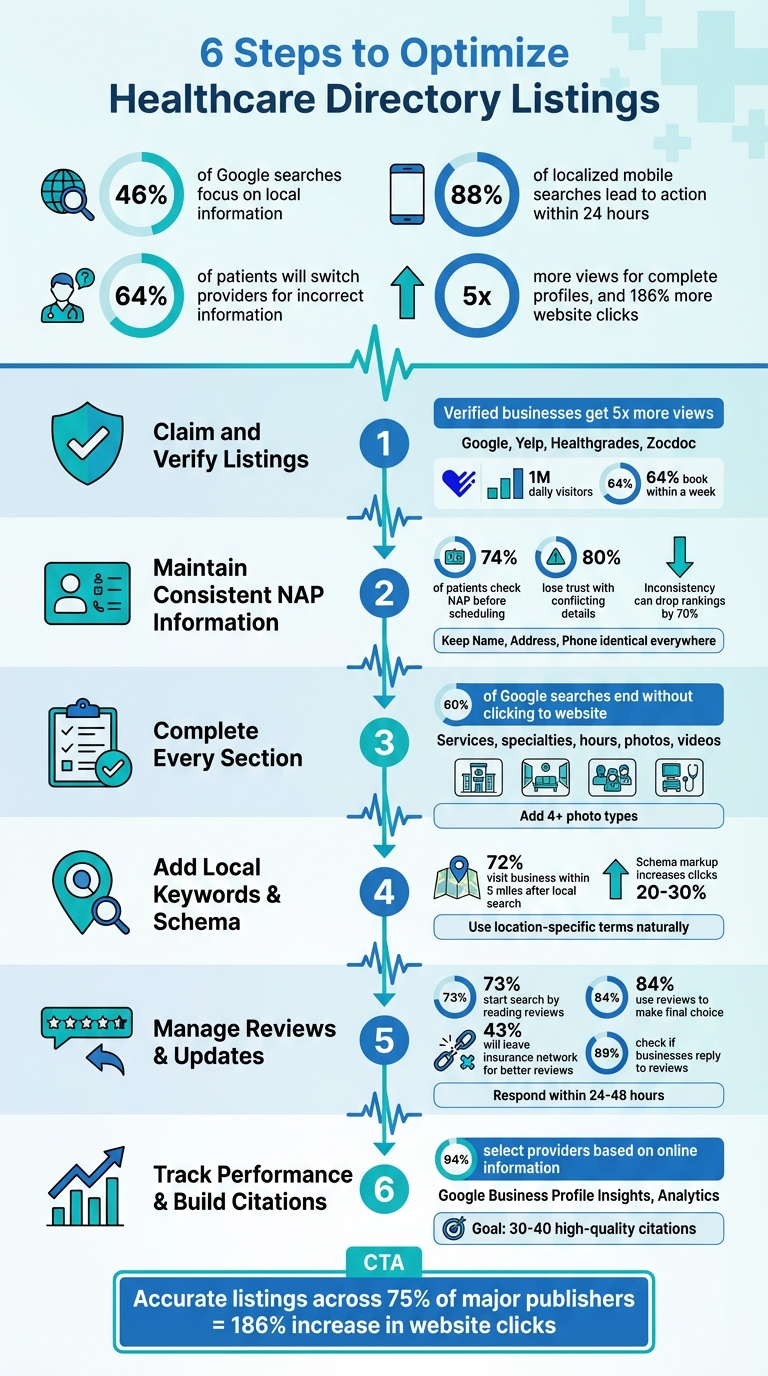
6-Step Healthcare Directory Optimization Process with Key Statistics
SEO and Google Business Profiles for Healthcare
sbb-itb-f6ab3ee
Step 1: Claim and Verify Your Directory Listings
Before you can optimize your online presence, you need to claim your healthcare directory listings. Many practices already have profiles on major directories, often created by patients, Google, or even competitors. If these listings are unclaimed, you lose the ability to control the information displayed, respond to reviews, or update critical details like your operating hours. Verified businesses are perceived as more trustworthy, and complete Google Business Profiles attract five times more views compared to incomplete ones. Once you’ve claimed your listings, focus on ensuring all information is accurate and up-to-date across platforms.
Finding the Right Directories for Your Practice
Start with the "Big 5" platforms that dominate local search: Google Business Profile, Facebook, Bing, Apple Maps, and Yelp. Then, move on to healthcare-specific directories like Healthgrades, Vitals, and Zocdoc, which are tailored to patients actively searching for healthcare providers. For example, Healthgrades attracts 1 million daily visitors, and 64% of those visitors book an appointment within a week of starting their search.
If managing multiple listings feels like too much, prioritize the top directories with the highest domain authority and consider niche platforms relevant to your specialty. For instance, a dermatologist might benefit from RealSelf, while a pediatrician could focus on KidsHealth. To stay organized, maintain a spreadsheet with the URLs of all your directory profiles, making it easier to update information when needed.
It’s also important to create profiles for each practice location and provider. For instance, a practice with two offices and four doctors should have six separate Google Business Profiles – one for each location and one for each doctor. This ensures patients can find both your practice and the specific physician they’re looking for.
Completing the Verification Process
Verification is essential to prove you’re the rightful owner of your profiles and to unlock full control over them. For Google Business Profile, the verification process typically involves receiving a postcard (which can take up to two weeks), or using alternative methods like phone calls, text messages, emails, or video recordings. The method available to you will depend on your practice type and location.
If you choose video verification, you’ll need to record a short, continuous video (under two minutes) that includes clear footage of your office’s exterior signage (with the address visible) and a quick interior view, such as the reception area. Keep the file size under 75 MB. Be cautious with phone verification if your practice uses an automated phone system, as it may interfere with the verification prompts.
"If you don’t take ownership of your Google Business Profile, you risk confusing potential customers with misinformation." – Karmin Gentili, Tebra
For other directories like Healthgrades, Zocdoc, and Yelp, the process is similar. Search for your practice, click on options like "Claim this listing" or "Own this business?", and create an account using your practice’s official email domain (avoid personal Gmail accounts). Follow the verification steps to gain control of your profile. Once verified, you can update your information, upload photos, respond to patient reviews, and access performance analytics to understand how patients are finding you.
Claiming and verifying your listings is a critical first step. It lays the groundwork for consistent NAP (Name, Address, Phone) details and sets you up for better local search performance as you move into further optimization steps.
Step 2: Maintain Consistent NAP Information
Your practice’s Name, Address, and Phone number (NAP) serve as its unique fingerprint online. Even small inconsistencies – like "St." versus "Street" – can confuse search engines and harm your local search rankings. For example, 74% of patients check a provider’s NAP before scheduling an appointment, and 80% lose trust if they find conflicting details. Getting this right is a critical first step before diving into broader NAP consistency efforts.
How Inconsistent Information Hurts Your Rankings
Search engines need consistent NAP data to confirm your practice’s credibility. If Google finds mismatched phone numbers, outdated addresses, or variations in your business name across directories, it can lose confidence in displaying your information. This can lead to a steep drop in your local search rankings – up to 70% lower compared to businesses with flawless NAP consistency.
Citations and external location signals are also key to local SEO success, ranking as the third most important factor. In fact, maintaining a well-optimized Google Business Profile with accurate NAP details accounts for 32% of local ranking weight.
But it’s not just about rankings. Inconsistent or incorrect information frustrates potential patients. Around 52% of people are likely to leave a negative review after encountering false details on a business listing. Worse, errors can spread as directories scrape outdated information from one another, creating a ripple effect of misinformation. Imagine a situation where an old phone number leads to a dead line or a patient shows up at the wrong address due to outdated details. To avoid these headaches, consider using reliable tools and standardizing your information.
"Search engines are basically doing a big ‘identity check.’ When your listings disagree, the algorithm and your customers both hesitate."
– Joey Pedras, TrueFuture Media
Tools for Checking NAP Consistency
Keeping your NAP information consistent doesn’t have to be overwhelming. Start by creating a master record – a single document that includes your official business name, address (including suite numbers, if applicable), and primary phone number. Decide on formatting standards, such as whether you’ll use "Street" or "St." and "Suite" or "Ste.", and stick to them across all platforms. While Google can handle minor variations, precise and accurate information is always better.
You can also manually track discrepancies using Google search operators. For example, search:
site:healthgrades.com "Your Practice Name" -"Correct Phone Number" This technique helps you identify outdated or incorrect listings on specific directories. Additionally, cross-check official records, like Secretary of State filings or BBB listings, to spot inconsistencies. Begin by updating the "Big Five" platforms – Google Business Profile, Apple Maps, Bing Places, Yelp, and Facebook – before tackling healthcare-specific directories like Healthgrades and Zocdoc.
For a more automated approach, tools like Moz Local (around $50 annually) can streamline the process. These tools scan the web, flag inaccuracies, and update multiple directories at once. They also sync with major data aggregators like Acxiom and Localeze, which distribute your information to dozens of smaller directories. This approach not only saves time but also prevents errors from spreading. Businesses with listings across 10 or more directories have been shown to improve their local visibility on Google by an average of 80%.
"If all you’re doing is updating your Google+ Local Page, you’re going to continue to see problems because ‘new’ erroneous data will constantly feed into Google from all of its other sources."
– David Mihm, Moz
Step 3: Complete Every Section of Your Profile
Once your listings are verified and consistent, the next step is to fully complete every section of your profile. Think of your directory profile as your practice’s "digital front door" – it’s often the first impression patients get online. A complete profile can generate up to 5 times more views and attract patients who are ready to book. With nearly 60% of Google searches ending without a click to a website, your profile needs to provide all the answers upfront. This not only boosts your local SEO but also builds trust, making it easier for patients to choose your practice.
Every field matters. Skipping sections like "Services", "Attributes", or "Business Hours" sends the wrong message to both search engines and potential patients. Google favors businesses with detailed and reliable information, and incomplete profiles simply won’t rank as high in local searches. Beyond rankings, 74.5% of patients verify a provider’s contact information before booking an appointment. If they can’t find the details they need – like your hours, insurance options, or accessibility features – they’ll likely move on to a competitor who provides that information.
Adding Photos and Videos
Visuals are incredibly powerful when it comes to building trust and improving patient engagement. High-quality photos of your facility, staff, and equipment make your practice feel approachable and professional before patients even step inside. To create a well-rounded visual profile, upload at least four types of images:
- Exterior shots of your building to help patients locate you.
- Interior photos of your waiting and exam rooms to highlight cleanliness and comfort.
- Staff pictures to add a personal touch and humanize your team.
- Specialized equipment to showcase your expertise and capabilities.
For example, in 2023, Mercy Medical Center in Cedar Rapids, IA, updated 63 location profiles with new photos and trackable URLs. Over a year, these profiles appeared in 3.6 million online searches, resulting in 117,802 website visits, 216,305 phone calls, and 64,236 requests for directions. Similarly, Cone Health in North Carolina revamped its profiles by adding unique content, including services and FAQs. Within five months, their top new profile saw a 274% increase in pageviews and a 40% drop in bounce rate compared to the previous year.
"Visuals build trust faster than words. Upload high-quality images of your team, your space, and your treatments."
– Medical Marketing Whiz
Short videos can also make a big impact. Consider adding a 30-second clinic walkthrough or a "meet the doctor" introduction to foster a personal connection with potential patients. Just make sure all visuals comply with HIPAA regulations – avoid showing any patient-identifiable information, and always get written consent before sharing content featuring patients.
Listing Services, Specialties, and Hours
Be specific when listing your services. Instead of a broad term like "general care", break it down into detailed offerings such as "annual wellness exams", "Botox treatments", or "hormone therapy". This level of detail helps search engines match your profile with patient searches like "acne treatment dermatologist" or "pediatrician accepting new patients." Use the full 750-character limit in your business description, incorporating local keywords and landmarks naturally to improve visibility.
Include additional tags like "women-led", "LGBTQ+ friendly", "free parking," or "wheelchair accessible" to highlight features that matter to patients during their decision-making process. Don’t forget to add a direct "appointments" link to your online scheduling tool – this captures patients when they’re most ready to book. Lastly, keep your business hours accurate, including updates for holidays or special closures. Incorrect hours can frustrate patients and push them toward competitors.
Step 4: Add Local Keywords and Schema Markup
Once your profile is fully completed, the next step is to make sure search engines clearly understand what you offer and where you’re located. Google prioritizes relevance – how well your profile aligns with a search query – as one of the key factors for local rankings. By being specific and intentional with your information, you can make it easier for search engines to connect your practice with patients actively searching for your services. Considering that 46% of all Google searches are for local information and 72% of people visit a business within five miles after a local search, this step can have a direct impact on attracting more patients. Building on your completed profile, integrating location-specific language is a smart way to boost your visibility.
Using Local Keywords in Your Listings
Think about how potential patients search online. They’re not typing vague terms like "doctor" or "clinic." Instead, they’re searching for phrases like "physical therapist near me", "urgent care in Brooklyn", or "orthodontist accepting new patients." Your goal is to reflect that language in your profile. Use the business description and services section to naturally include treatment names, specialties, and geographic references like neighborhoods or landmarks. This not only helps search engines match your profile to specific queries but also improves your chances of showing up in voice searches, which are three times more likely to include local intent than text searches.
For example, in July 2025, marketer Dana Nicole optimized a local restaurant’s Google Business Profile by adding location-specific keywords to its description. Within six days, the restaurant saw a noticeable improvement in ranking for the search term "ice cream near me", as Google recognized its relevance to the area. Similarly, Chris Hinman, CEO at TheBestReputation, optimized 15 locations for a coffee shop chain on Apple Business Connect. By using conversational descriptions tailored to how people talk to Siri, the chain experienced a 28% increase in Apple Maps direction requests and a 15% rise in "Call" button taps within six months.
A critical reminder: never add keywords to your "Business Name" field. Google strictly prohibits this, and breaking the rule can result in suspension. Instead, focus on other sections like your description, services, FAQ, and Google Posts to naturally incorporate relevant keywords. Use the Insights tab in your Google Business Profile to track the exact search terms people use to find you, then update your profile with those terms.
Once your keywords are in place, the next step is implementing structured data to ensure search engines interpret your information correctly.
Implementing Schema Markup
Schema markup is a type of structured data that organizes your business details – like hours, location, services, and reviews – in a format that search engines can easily understand. This is especially useful in competitive local markets, where even small optimizations can make a difference. Schema markup can help trigger enhanced results in search, such as listings with star ratings, operating hours, and location details. These enhanced results typically lead to a 20% to 30% increase in clicks compared to standard listings.
To implement schema, use the JSON-LD format, which remains the recommended standard as of 2026. Be specific when selecting your schema type – choose options like Dentist, Hospital, or MedicalBusiness instead of the more generic LocalBusiness. Include precise latitude and longitude data, especially if your practice is located in a large medical complex or a shared office space, to avoid confusion. Always validate your schema using tools like the Google Rich Results Test to catch any missing fields or errors.
"Local business schema markup is no longer optional in 2026. It is a structural trust layer that helps Google, Maps, and AI systems understand exactly who you are, where you operate, what you offer, and why your business is legitimate." – LocalMighty
Using schema also ensures that AI-driven search systems and Large Language Models can reference your practice with greater confidence and accuracy. As search technology evolves, this step will help keep your practice easily discoverable.
Step 5: Manage Reviews and Keep Information Current
After fine-tuning your profile and adding schema markup, the next step is to actively manage reviews and keep your practice information up to date. These efforts not only boost your search rankings but also build patient trust. Consider this: 73% of patients start their search for a provider by reading online reviews, and 84% use those reviews to make their final choice. Even more striking, 43% of patients are willing to leave their insurance network for a provider with better reviews. Yet, nearly half of patients (44%) say their provider has never asked them to leave a review. That’s a missed opportunity to strengthen your online reputation.
Getting and Responding to Patient Reviews
The best time to ask for a review? Right after an appointment. Use SMS (which has a 45% response rate) or email to make the process quick and easy. You can also set up QR codes, website links, or even posters in your office lobby for convenience. Train your front-office staff to mention reviews during checkout – it’s a simple step that can make a big difference. Since 83% of people rely on Google to evaluate businesses, prioritize collecting reviews on this platform.
That said, stay within the rules. Offering incentives for reviews is against platform policies. Similarly, avoid "review gating", where only patients with positive experiences are asked to leave feedback – this violates Google’s terms of service. And don’t forget about HIPAA compliance: keep review requests generic and avoid mentioning any Protected Health Information (PHI).
Responding to reviews is just as important as collecting them. 89% of people check whether businesses reply to reviews, and 88% prefer businesses that engage with feedback. Aim to respond – whether the review is glowing or critical – within 24 to 48 hours to show patients you value their input. Always thank reviewers, remain professional, and avoid confirming that the reviewer is a patient or discussing any PHI. For negative reviews, offer a phone number or email to resolve issues offline. Interestingly, 70% of people are willing to update a negative review if the business addresses their concerns.
Updating Your Listings Regularly
Once you’ve nailed your review strategy, turn your attention to keeping your directory information accurate. This isn’t a one-and-done task – regular updates signal to Google that your practice is active and trustworthy, which can boost your local search rankings. Errors in your details can frustrate patients and lead to missed appointments. In fact, 74.5% of patients double-check a provider’s contact information before booking.
To avoid these pitfalls, schedule monthly audits of your directory listings. Ensure your Name, Address, and Phone (NAP) details are always correct – these are critical for SEO and patient accessibility. Update business hours immediately for holidays, seasonal changes, or temporary closures. If you add or remove services, specialties, or accepted insurance plans, refresh the "Services" section right away. Don’t forget visuals: upload fresh, high-quality photos of your office and team every quarter to help build familiarity and trust.
Here’s a quick reference guide to keep you on track:
| Priority Information | Why It Matters | Update Frequency |
|---|---|---|
| NAP Data | Core SEO factor; ensures patients can contact you | Monthly / Upon Change |
| Business Hours | Avoids patient confusion; builds reliability | Immediate (for changes) |
| Services & Insurance | Aligns with patient searches for specific needs | Quarterly / Upon Change |
| Patient Reviews | Builds trust; influences patient decisions | Weekly (Response) |
| Photos & Videos | Boosts engagement; complete profiles get 5x more views | Quarterly |
Step 6: Track Performance and Build Citations
Tracking how your directory listings perform and building accurate citations are key to expanding your reach. With nearly 94% of patients selecting healthcare providers based on online information, keeping tabs on your performance is critical for growth.
Measuring Directory Performance
Start by diving into Google Business Profile Insights, which provides data on profile views, website clicks, and phone calls generated from your listing. To go deeper, connect Google Search Console with Google Analytics to see which keywords are driving traffic and identify any technical issues. For phone tracking, use dynamic number insertion while ensuring your Name, Address, and Phone (NAP) information remains consistent.
"Proper tracking is the single most important element in your local business digital marketing stack." – Nick Pierno, Director of Custom Projects at Whitespark
Run monthly citation audits to catch unauthorized changes made by third-party aggregators. This allows you to fine-tune your listings and maintain consistent engagement with potential patients.
Here’s a quick breakdown of what to monitor and the tools that can help:
| Metric Category | What to Track | Tools to Use |
|---|---|---|
| Visibility | Profile views, search impressions, keyword rankings | Google Business Profile, Moz Local, SEMrush |
| Engagement | Website clicks, direction requests, photo views | GBP Insights, Google Analytics |
| Conversions | Appointment bookings, form fills, phone calls | Google Analytics (Goals), CallRail |
| Data Integrity | NAP consistency score, total citation count | BrightLocal, Yext, PatientTrak |
Creating More Citations
Once you’ve analyzed your performance data, focus on building high-quality citations to boost your local search rankings. Citations – mentions of your practice’s name, address, and phone number – are one of the top factors influencing local search results. Tools like Moz Local or BrightLocal can help you audit your listings and clean up duplicates or inaccuracies. For larger healthcare systems, this process can involve managing thousands of duplicate listings.
To improve your rankings, establish a standardized NAP format and stick to it. Even small inconsistencies, such as using "Suite" versus "#", can negatively impact your rankings. Start by securing listings on major platforms like Google Business Profile, Apple Maps, Bing Places, Yelp, and Facebook. Then, expand to data aggregators like Data Axle, Foursquare, and Neustar Localeze. For healthcare providers, also prioritize industry-specific sites like Healthgrades, Zocdoc, or your state medical board.
Rather than chasing hundreds of low-value listings, aim for 30 to 40 high-quality citations. This approach delivers better returns on investment. Keep a master spreadsheet with URLs and login credentials for all your listings so updates can be made quickly when needed.
Conclusion
Long-Term Benefits of Directory Optimization
Investing in healthcare directory optimization pays off over time, delivering results that build on themselves. For instance, keeping accurate details across 75% of major publishers can lead to an impressive 186% increase in website clicks from your Google Business Profile alone. This kind of visibility directly translates into more patient appointments.
But the advantages go far beyond just traffic. Consider this: 76% of consumers who perform a "near me" search visit a related business within 24 hours. By ensuring your listings are optimized, you’re positioning your practice to capture patients precisely when they’re ready to book. Plus, with 91% of people emphasizing the importance of accurate information when choosing a business, maintaining consistent and precise details not only builds trust but also safeguards your reputation before patients even step into your office. On top of that, these optimized directories protect your brand’s online presence from inaccuracies or competitors.
Being visible in search results doesn’t just bring in more patient inquiries – it also blocks competitors from taking over your search space. And as AI tools like Google Gemini and ChatGPT increasingly rely on directory listings for local business information, having accurate data today ensures that future AI-generated summaries represent your practice correctly. This is especially crucial as zero-click searches become more common, keeping potential patients on search engines rather than clicking away.
The bottom line? Optimizing your directories now sets you up for long-term success, and having expert support can simplify the process.
How Medical PPC Agency Can Help
Balancing directory management while running a busy practice isn’t easy. That’s where Medical PPC Agency steps in to simplify the process. We centralize your provider data, apply schema markup to ensure accurate AI categorization, and handle complex verification tasks, including Google’s video verification requirements.
Our team also takes care of the ongoing work that keeps your listings at peak performance. This includes monthly NAP (Name, Address, Phone) audits, HIPAA-compliant responses to patient reviews, and regular profile updates to show activity to search engines. For practices with multiple locations and providers, the complexity grows quickly – two locations with four doctors mean managing six distinct profiles. We ensure every profile is claimed, verified, and fully optimized, so you can focus on what matters most: patient care.
Ready to enhance your online visibility and bring more patients to your practice? Visit Medical PPC Agency to learn how our data-driven strategies can make a difference.
FAQs
Which directories should my practice prioritize first?
Your practice should prioritize listing on high-traffic, influential directories like Google My Business, Healthgrades, Vitals, and ZocDoc. These platforms are excellent for boosting your visibility and drawing in more patients through local search.
How can I fix duplicate or outdated listings online?
To get started, pinpoint all the online listings for your practice. Make sure you claim or verify the accurate ones so you can update outdated details, like your address or business hours. If you come across duplicate listings, either merge them or remove them by marking them as closed or submitting a removal request. Using tools such as listing management platforms can simplify the process. Keeping your listings up to date ensures consistency, boosts your local SEO, and helps patients access the right information about your practice.
What’s a HIPAA-safe way to respond to negative reviews?
When replying to negative reviews, especially in healthcare settings, it’s crucial to stay HIPAA-compliant. This means avoiding any mention of Protected Health Information (PHI) – don’t confirm or reference patient identities, conditions, or treatments.
Instead, keep your responses short, professional, and neutral. Acknowledge the feedback in a general way and express a willingness to address concerns privately. For example, you might say: “We take all feedback seriously. Please contact our office directly so we can assist you further.”
Using pre-approved templates or internal guidelines that prioritize privacy can help maintain consistency and compliance. This way, you safeguard patient confidentiality while demonstrating professionalism and care.