
Your website is often a patient’s first stop, but technical SEO issues can make it invisible. Here’s the reality: 53% of mobile users leave healthcare sites that take over 3 seconds to load, and 96% of healthcare websites fail at least one Core Web Vitals metric. These problems don’t just hurt rankings – they reduce appointment requests, calls, and patient engagement.
Key Issues and Fixes:
- Slow Loading Times: Speed matters. Optimize images, enable compression, and upgrade hosting for faster performance.
- Poor Site Structure: Ensure important pages are easy to find within 2–3 clicks. Use internal links and fix duplicate content.
- Mobile Issues: Most searches happen on mobile. Responsive design and Google’s Mobile-Friendly Test can help.
- Crawling & Indexing Errors: Check robots.txt, fix NOINDEX tags, and submit XML sitemaps to Google.
- Missing Schema Markup: Add structured data for provider details, hours, and services to improve search visibility.
Takeaway: A well-maintained website isn’t just about rankings – it’s about better patient experiences and practice growth. Regular audits and professional SEO support can keep your site performing at its best.
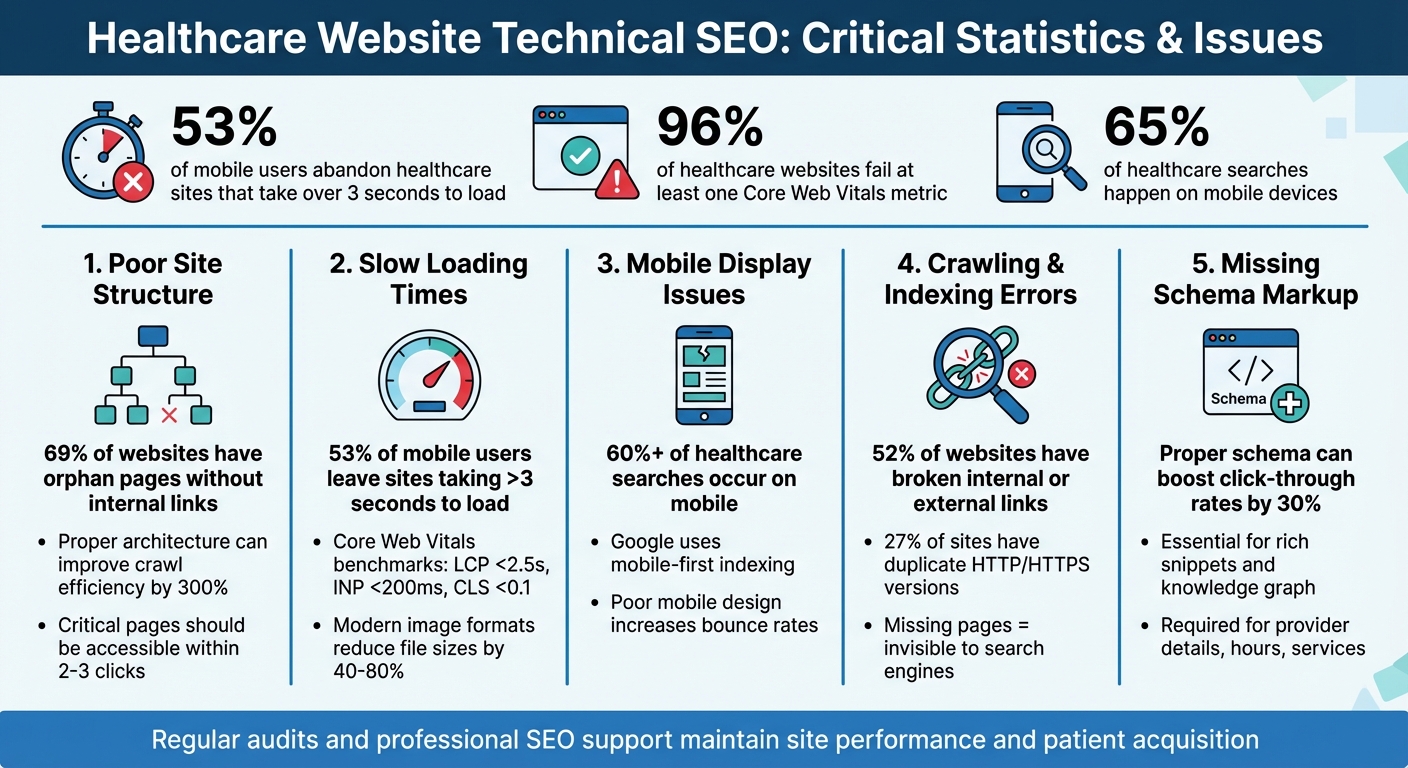
Healthcare Website Technical SEO Statistics and Key Issues
Technical SEO for Healthcare Websites: Fixes That Improve Rankings and Conversions
Common Technical SEO Problems for Medical Websites
Medical websites often face several technical challenges that can hinder their visibility in search engines. These issues make it harder for potential patients to find your practice when searching for healthcare services online.
Poor Site Structure
A common problem is that critical pages – like appointment forms or service descriptions – are buried too deep within the site, often requiring more than 2–3 clicks to access from the homepage. This not only confuses visitors but also makes it difficult for search engine crawlers to navigate and index your content effectively. Pages without internal links, often referred to as "orphaned pages", are particularly problematic because Google may never discover or index them. Duplicate content across location or service pages further complicates things, potentially leading to lower rankings for essential information.
Another frequent issue is the absence of a clear "hub-and-spoke" structure, where main topics act as hubs, linking to related subtopics. Without this, search engines struggle to understand your site’s organization and authority on specific topics. Research shows that implementing a solid site architecture can improve crawl efficiency by as much as 300%.
While structure is key, the speed at which your website loads is equally important to both users and search engines.
Slow Loading Times
Page speed has a direct impact on both your rankings and user engagement. Studies indicate that 53% of mobile users abandon websites that take more than 3 seconds to load. Slow-loading pages also affect your crawl budget, meaning search engines may not index new content as quickly. Google’s Core Web Vitals set specific benchmarks: LCP (Largest Contentful Paint) should be under 2.5 seconds, INP (Interaction to Next Paint) under 200 ms, and CLS (Cumulative Layout Shift) below 0.1. However, a study of over 50,000 domains revealed that 96% of websites fail at least one of these metrics.
Crawford Ifland, host of the Medical Marketing Podcast, highlights the importance of speed improvements:
Improving their mobile websites to make them load more quickly and make them easier to use has a direct correlation to increases in the number of patients requesting appointments when they’re browsing on their phones.
Speed optimization ties closely to how your site performs on mobile devices, which is another critical factor.
Mobile Display Issues
Most healthcare searches now happen on mobile devices. If your website isn’t optimized for mobile, you risk frustrating users and driving them away. Google’s mobile-first indexing means that your mobile site’s performance directly affects your overall rankings. Poor mobile design – such as small fonts or buttons that are too close together – can lead to higher bounce rates, signaling to search engines that your site may not provide a good user experience.
In addition to structure, speed, and mobile optimization, ensuring that your site is free from crawling and indexing errors is essential.
Crawling and Indexing Errors
If search engines can’t crawl or index your pages, they won’t appear in search results, making them invisible to potential patients. Common issues include improperly configured robots.txt files that block search engines, residual NOINDEX meta tags, and missing XML sitemaps. As seoClarity explains:
As far as Google is concerned, if your pages aren’t indexed, they don’t exist – and they certainly won’t be found on the search engines.
JavaScript-loaded content can also cause delays in indexing since Google processes JavaScript on a "second pass", which might take days or weeks. To check your site’s indexing status, use the search operator site:yourmedicalsite.com.
Even if your pages are indexed, they need structured data to stand out in search results.
Missing Schema Markup
Schema markup is crucial for helping search engines understand specific information on your site, such as provider credentials, office hours, insurance details, and treatments offered. Without it, your practice misses out on appearing in rich snippets, carousel results, and Google’s knowledge graph. Naghmeh Jafarzadeh, Senior SEO Specialist at Healthcare Success, underscores its importance:
Proper schema allows search engines to return more informative results. It also helps populate rich snippets, carousel results and the knowledge graph.
How to Fix Technical SEO Problems in Healthcare
After identifying the technical issues affecting your medical website, the next step is to apply targeted solutions. Here’s how to tackle the most pressing problems effectively.
Fixing Site Structure
Make sure all crucial pages are accessible within three clicks. Use site audit tools to locate orphan pages and connect them to appropriate parent or category pages. Your URL structure should mirror your site’s hierarchy – use hyphens to separate words (e.g., domain.com/services/pediatrics) instead of underscores.
Add breadcrumb navigation at the top of each page to show users their path and help search engines better understand your site’s structure. Incorporate internal links with descriptive anchor text to spread authority across your pages and clarify their relationships. As Asif Ali from Semrush points out:
A single line of code in robots.txt can prevent search engines from crawling your entire site. Make sure your robots.txt file doesn’t disallow any folder or page you want to appear in search results.
To avoid duplicate content issues, use canonical tags (rel="canonical") to indicate the master version of each page. This is especially important for sites where both HTTP and HTTPS versions are accessible – 27% of websites fall into this trap, leading to unnecessary duplication.
Speeding Up Page Load Times
Optimizing images can significantly boost your site’s speed. Replace outdated JPG or PNG files with modern formats like WebP or AVIF, which can cut file sizes by 40–80%. Use the srcset attribute to serve images tailored to different devices and enable lazy loading to prioritize visible content.
Minify and combine CSS and JavaScript files to reduce HTTP requests. Set non-essential scripts to async or defer to prevent them from blocking the page’s load process. Enable Gzip or Brotli compression on your server to shrink text-based files. If your server’s Time to First Byte (TTFB) exceeds 600 milliseconds, consider upgrading your hosting – ideally, aim for under 200 milliseconds.
Using a Content Delivery Network (CDN) can also improve load times by serving static files from servers closer to your users. Additionally, if you’re still relying on HTTP/1.1, upgrading to HTTP/2 will allow multiple files to be sent simultaneously through a single connection.
Improving page speed not only enhances user experience but also complements mobile optimization efforts.
Making Websites Mobile-Friendly
Mobile performance is a critical factor in search rankings. Use responsive design to ensure your site adapts seamlessly to different screen sizes, and make sure tap targets are large enough for easy navigation on mobile devices.
Run your site through Google’s Mobile-Friendly Test tool to identify usability issues. Mobile pages should meet Core Web Vitals benchmarks: Largest Contentful Paint (LCP) under 2.5 seconds, Interaction to Next Paint (INP) under 200 milliseconds, and Cumulative Layout Shift (CLS) below 0.1. With over 60% of healthcare searches happening on mobile devices, optimizing for mobile is non-negotiable.
Resolving Crawling and Indexing Problems
Check your robots.txt file to ensure it isn’t blocking essential resources like CSS or JavaScript files, as search engines need these to render your pages correctly. Remove any leftover NOINDEX meta tags from pages you want to appear in search results, and submit an XML sitemap via Google Search Console to help search engines discover your key pages.
Use the search operator (site:yourmedicalsite.com) to check which pages are indexed. If important pages are missing, investigate potential issues like robots.txt blocks, NOINDEX tags, or insufficient internal links. Eliminate redirect chains to improve crawl efficiency and enhance the user experience. Research shows that 69% of websites have orphan pages without internal links, which can hinder discoverability.
Adding Schema Markup
Leverage the JSON-LD format for structured data. Place the code in your HTML <head> or <body>. For healthcare providers, use schema types like MedicalBusiness, Physician, LocalBusiness, and Organization.
Ensure that key details – such as your name, address, phone number (NAP), operating hours, physician profiles, accepted insurance, and appointment links – match the information in your Google Business Profile. Use the @id attribute to link related schema nodes, such as connecting a Physician to a specific MedicalBusiness location, to clarify relationships. Martha van Berkel, CEO of Schema App, explains:
We found that disambiguating entities like places resulted in pages performing better on [near me] and other location-based search queries.
Before publishing, validate your schema markup using Google’s Rich Results Test to catch errors that might prevent rich snippets from displaying. Errors in your schema could even lead to manual penalties from Google, making your page ineligible for rich results.
sbb-itb-f6ab3ee
Maintaining Technical SEO Over Time
Addressing technical SEO issues is just the start; keeping your site optimized requires ongoing effort. Google modifies its search algorithms thousands of times a year. Without regular maintenance, your site’s performance can decline, impacting search visibility and patient acquisition. Once initial problems are resolved, consistent monitoring and updates are critical to maintaining your site’s health.
Running Regular Technical Audits
After tackling key problems like slow load times and indexing issues, regular audits ensure that your improvements stick. Aim for a monthly health check and a more detailed audit every 3–6 months. These audits should cover crawlability, broken links, Core Web Vitals, and site security. Michael Myshin from MedResponsive highlights the importance of this practice:
Monthly SEO-centric site audits are your frontline in a year where speed, security, content quality, and user experience largely determine search performance.
Prioritize critical issues first – like 5xx server errors or 404 errors on high-traffic pages – before moving on to less urgent problems, such as missing alt text. Tools like Semrush Site Audit, Ahrefs, or Screaming Frog can help you quickly identify broken links and indexing errors. Research indicates that 52% of websites have broken internal or external links, a problem that can escalate quickly, especially on larger medical sites without regular oversight.
Keeping Up with Google Algorithm Updates
Google’s major algorithm updates typically roll out several times a year, sometimes taking weeks to complete. Stay informed by following resources like the Google Search Central Blog and the Google Search Status Dashboard, which announce when updates begin and end.
After an update, wait about a week before analyzing your site’s performance in Google Search Console. Compare traffic data from the week after the update to the week before it started to identify any significant impacts. If rankings drop noticeably, evaluate your content using Google’s self-assessment questions to determine whether it genuinely benefits patients or was designed primarily for search engines.
Working with Professional SEO Services
If in-house efforts aren’t enough, professional SEO services can provide the expertise needed to keep your site’s technical aspects in check. Technical SEO is often overlooked due to its complexity, with challenges like broken links, schema errors, and server issues requiring advanced skills. Tasks such as properly implementing HTTPS, optimizing Core Web Vitals, or resolving server errors often demand collaboration with developers. Specialized agencies are well-versed in healthcare-specific needs, such as adding medical schema markup to improve how search engines display patient-relevant information.
These agencies also bridge the gap between technical data and measurable outcomes, such as patient acquisition and ROI. For example, Medical PPC Agency offers a range of digital marketing solutions tailored to healthcare providers, including SEO services, PPC campaign management, and AI-driven systems to enhance online visibility and practice growth through data-informed strategies.
Conclusion
Technical SEO forms the backbone of any effective healthcare marketing strategy. Without it, even the best patient reviews and high-quality content can go unnoticed by search engines, leaving your practice invisible to potential patients. Issues like poor site structure, sluggish load times, and missing schema markup can significantly impact key metrics such as appointment bookings, self-assessments, and phone inquiries.
The stakes are high – overlooking technical SEO doesn’t just hurt your rankings; it directly affects your bottom line by driving away mobile visitors and, ultimately, new patients. These aren’t abstract problems; they’re real barriers to growth.
Addressing technical SEO challenges promptly is crucial. A well-organized site architecture improves crawl efficiency, ensuring search engines can easily find and prioritize your most important service pages. Adding healthcare-specific schema markup can also make a measurable difference, potentially boosting click-through rates by 30%.
For practices looking to sustain these improvements, professional expertise can be a game-changer. If in-house resources are limited, partnering with specialists who understand both SEO and healthcare regulations can provide a competitive edge. Agencies like Medical PPC Agency offer tailored solutions, including SEO services, PPC campaign management, and AI-powered patient acquisition tools. These services not only enhance your online visibility but also ensure compliance and support long-term growth through data-driven strategies.
Take action now – whether through internal audits or by leveraging professional support – to capture the 65% of healthcare searches happening on mobile devices. Staying proactive will help your practice adapt to ever-changing algorithms and keep you ahead in an increasingly digital landscape.
FAQs
What are the best ways to improve my healthcare website’s loading speed?
Improving your healthcare website’s loading speed is all about fine-tuning the elements that impact performance. Start by choosing a reliable hosting provider to ensure quick server response times and enable caching to store data more effectively. Compress large files, like images, to shrink their size while keeping the quality intact. Another key step is to minify and streamline your HTML, CSS, and JavaScript files, which helps your pages render faster. The goal? Get your pages to load in under 3 seconds – this not only enhances the user experience but also gives your SEO a boost.
What is schema markup, and why does it matter for medical websites?
Schema markup is a form of structured data that helps search engines interpret the content on your website more effectively. For medical websites, it’s particularly valuable because it enhances how your site is displayed in search results, enabling features like rich snippets, knowledge panels, and other eye-catching search enhancements.
In the healthcare space, schema markup holds even greater significance. It signals expertise, authority, and trustworthiness (E-A-T) – qualities that are essential for health-related searches. By implementing schema, medical websites can improve their visibility, connect with more patients, and establish credibility with both search engines and users.
Why is mobile optimization important for my healthcare website’s SEO?
Mobile optimization plays a key role in your healthcare website’s SEO, especially since Google now uses mobile-first indexing. This means Google prioritizes websites that are mobile-friendly, making it essential for your site to perform well on smaller screens. A mobile-optimized site ensures quicker loading times, smooth navigation, and improved visibility in local searches – all of which can help earn patient trust and boost your search rankings.
When your site is responsive and works seamlessly across all devices, it not only enhances the user experience but also increases your chances of attracting and keeping more patients.