
Google Ads is a pay-per-click (PPC) platform that helps chiropractors attract local patients by placing their ads at the top of search results. Chiropractors only pay when someone clicks on their ad, making it a cost-effective way to reach people searching for services like "back pain relief near me" or "chiropractor accepting new patients."
Key Takeaways:
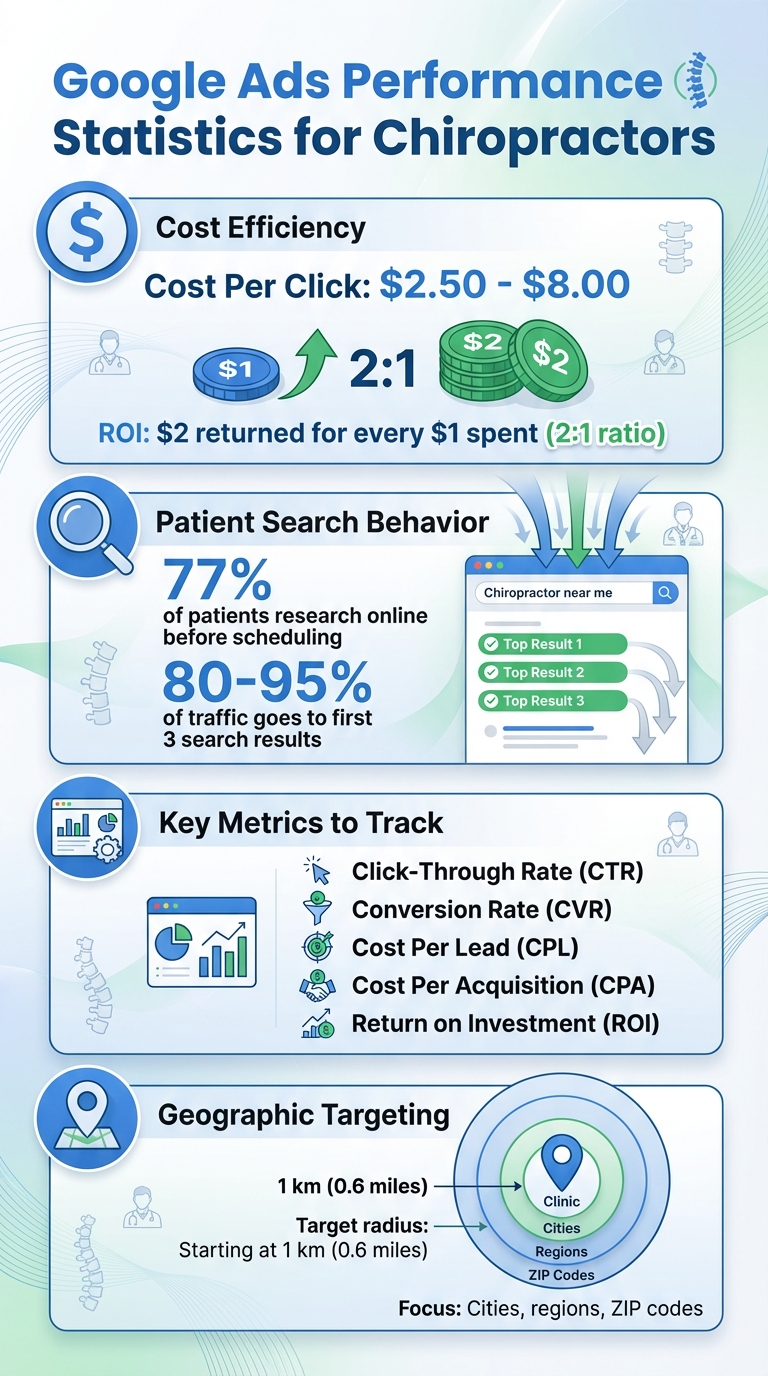
- Cost-Effective Advertising: Chiropractors typically pay $2.50–$8.00 per click, with an average return of $2 for every $1 spent.
- Immediate Visibility: Unlike SEO, Google Ads can display your practice at the top of search results within hours of launching a campaign.
- Local Targeting: Ads can focus on specific geographic areas (e.g., zip codes or a set radius) and demographics to reach nearby patients.
- Trackable Results: Metrics like click-through rate (CTR), conversion rate (CVR), and cost per lead (CPL) help measure performance and ROI.
Quick Setup Tips:
- Account Configuration: Use "Expert Mode" on ads.google.com for full control.
- Keyword Strategy: Focus on high-intent and location-specific terms like "chiropractor near me" or "sports injury chiropractor."
- Ad Copy: Highlight unique benefits (e.g., same-day appointments) with clear calls-to-action like "Book Now."
- Landing Pages: Ensure your landing page aligns with the ad and includes easy contact options, patient reviews, and fast load times.
- Performance Monitoring: Regularly review metrics, adjust bids, and add negative keywords to refine results.
By leveraging Google Ads, chiropractors can effectively connect with local patients, fill appointment slots, and grow their practice.
Google Ads ROI and Performance Metrics for Chiropractors
How Google Ads Connects Chiropractors with Local Patients
Search Campaigns for Chiropractic Keywords
Search campaigns are a powerful way to put your chiropractic practice in front of potential patients at the exact moment they’re searching for relief. Whether someone is looking for help with sciatica, auto injuries, or general back pain, your ad can appear right at the top of the search results. This prime placement ensures your services are visible when people need them most.
The key is choosing the right keywords – phrases like “back pain relief,” “neck adjustment near me,” or “sports injury chiropractor.” Including location-specific terms, such as your city or ZIP code, can make your ads even more relevant. For example, adding phrases like “chiropractic near me” helps you connect with individuals who are ready to book an appointment. Medical PPC Agency emphasizes the importance of incorporating local details to refine your keyword strategy.
In addition to selecting the right keywords, it’s equally important to target the right geographic areas to maximize your reach.
Geographic and Demographic Targeting
Google Ads allows you to focus your efforts – and your budget – on attracting patients within a practical distance from your clinic. You can target specific cities, regions, or even postal codes. Radius targeting is particularly useful, enabling you to reach patients within a set driving distance, starting as small as 1 km (0.6 miles).
For cities with common names, it’s a good idea to include additional details. For instance, instead of just “Paris,” specify “Paris, Texas” to avoid confusion. You can also exclude areas that are too far away or irrelevant to ensure your ad spend is used wisely. As Google Ads explains:
Location targeting helps you focus your advertising to help find the right customers for your business, and will hopefully help you increase your profits as a result.
Beyond geographic targeting, tailoring your ads to specific demographics can further improve their effectiveness. For example, Small Business SEO suggests crafting ads for particular groups, like “athletes needing sports injury care” or “parents searching for pediatric chiropractic services.” This approach broadens your reach while keeping your messaging relevant.
Once your ads are set up to reach the right people, the next step is measuring their performance.
Key Metrics to Track for Patient Acquisition
To understand whether your Google Ads are working, it’s essential to monitor the right metrics. Start with click-through rate (CTR), which measures how often people click your ad after seeing it. A high CTR indicates that your ad copy and targeting are resonating with your audience.
Another important metric is conversion rate (CVR), which shows how many clicks lead to actions like phone calls or appointment bookings. Additionally, keep an eye on cost per click (CPC) to understand how much you’re spending for each click, and cost per lead (CPL) or cost per acquisition (CPA) to see how efficiently your budget is turning into patient inquiries.
Lastly, tracking return on investment (ROI) will help you determine if your ad spend is generating more revenue than it costs. Don’t forget to monitor call metrics and form submissions, as these provide a more complete picture of how well your ads are engaging potential patients.
Setting Up a Google Ads Campaign for Chiropractors
Account and Goal Configuration
To get started, head over to ads.google.com, click "Start Now", and enter your practice’s details along with your website URL.
Skip the default settings by selecting "Switch to Expert Mode" – this gives you full control over your campaign. As Doctor of Marketing explains:
"Switching to Expert Mode will give you more control of your campaign settings."
Next, choose "Create an account without a campaign" to keep control over every aspect of your setup. Once your account is created, confirm your information and proceed to build your campaign.
When you’re ready to create a new campaign, click "New Campaign" and select your primary objective. For chiropractors, "Leads" is the best choice, as it focuses on capturing form submissions and appointment requests. Then, choose "Search" as your campaign type, which targets people actively searching for chiropractic care.
Set up your billing by entering your credit card details for USD payments. To track results, link your account to Google Analytics and enable conversion tracking through Google Tag Manager. This allows you to monitor key actions like calls, form submissions, and appointment bookings. As Doctor of Marketing emphasizes:
"Conversion tracking shows you what happens after a patient interacts with your ad. For example, if they signed up for your email lists, purchased a product, or called your office."
With the basics in place, the next step is creating a focused keyword strategy tailored to your local audience.
Keyword Strategy and Match Types
The success of your Google Ads campaign hinges on selecting the right keywords. Start with high-intent terms like "emergency chiropractor", "book chiropractor near me", or "walk-in chiropractor today." These keywords attract patients who are ready to take action.
Go a step further by targeting condition-specific terms that align with the services you offer. Examples include "chiropractor for lower back pain", "prenatal chiropractor near me", or "sports chiropractor for athletes." If your practice specializes in niche areas, use keywords like "pediatric chiropractor near me" or "chiropractor for TMJ pain relief" to reach specific patient groups.
Don’t forget to include location-specific keywords. Adding your city name, zip code, or neighborhood to phrases like "spinal adjustment near me" ensures your ads appear in local searches. Use Google Keyword Planner to uncover new keyword ideas and check search volumes for terms relevant to your audience.
To keep things organized, group your keywords into tightly themed ad groups. For instance, create a "Back Pain" ad group with terms like "back adjustments", "lower back pain", and "spinal stenosis." Keep unrelated terms, such as "neck pain", in separate groups. When it comes to match types, phrase match is your best bet – it strikes a balance by avoiding irrelevant traffic from broad match while being less restrictive than exact match.
Lastly, include negative keywords to filter out irrelevant searches. A well-structured keyword strategy ensures your ads reach the right audience, helping you connect with local patients effectively.
Once your keywords are in place, it’s time to optimize your ads with extensions and track their performance.
Using Ad Extensions and Conversion Tracking
Ad extensions are a powerful way to make your ads more engaging and useful. Add features like call, location, sitelink, and callout extensions to increase visibility and provide multiple ways for patients to contact you directly. These additions make your ad stand out and create a seamless path for potential patients to connect.
To measure your campaign’s success, set up conversion tracking. OnlineChiro.com highlights its importance:
"Conversion tracking is essential for advertising campaigns, particularly for chiropractors using Facebook Ads to generate leads. By tracking conversions, chiropractors can assess ad effectiveness and make informed marketing budget decisions."
Define clear goals, such as lead form submissions, phone calls, or appointment bookings. Implement tracking by adding a code to your website or using Google Tag Manager. This lets you monitor actions taken by patients, helping you identify which ads and keywords are driving real results. Use this data to fine-tune your budget and improve performance.
For example, if a patient visit is worth $200, spending $1–$2 per click with a 2% conversion rate could bring in two patients for every 100 visits. Even a small improvement in your conversion rate – say, from 2% to 7% – can significantly impact your revenue.
Writing Chiropractic Ads and Landing Pages That Convert
Creating Patient-Focused Ad Copy
When writing ad copy for chiropractic services, focus on using high-intent keywords that align with what potential patients are actively searching for. Phrases like "Back Pain Relief in [City]" or "Chiropractor Near Me – Same-Day Appointments" resonate with people looking for immediate solutions.
Highlight what sets your practice apart. Whether it’s walk-ins, free consultations, or proven patient success stories, make sure to use the full 90-character description space to include important details like insurance options, pricing, or credentials. Ad extensions can also increase your clickthrough rate by up to 15%.
The call-to-action should be straightforward and actionable. Use phrases like "Schedule Your Appointment Today," "Call Now for Relief," or "Book Your Free Consultation" to guide potential patients toward taking the next step. Keep your copy natural and readable – don’t overdo it with keywords, but make sure the most relevant terms are included.
Once someone clicks on your ad, the landing page should match the promise made in the ad, ensuring a seamless experience for the user.
Optimizing Landing Pages for U.S. Patients
Your landing page should deliver on the promises made in your ad. For instance, if your ad mentions a "New Patient Special," that offer should be front and center when visitors arrive on the page. This type of consistency builds trust and can also improve your Google Quality Score.
Make it easy for patients to get in touch. Display your phone number in a recognizable U.S. format, like (555) 123-4567, and include a click-to-call button for mobile users. A simple contact form asking for basic information – name, phone number, email, and reason for visit – can improve completion rates.
Adding trust-building elements is crucial. Include patient reviews, star ratings, and certifications your practice holds. Be transparent about payment options and accepted insurance providers. Also, make sure your landing page loads quickly and works well on mobile devices, as many patients are searching on their phones.
Best Practices for Ad and Landing Page Consistency
Consistency between your Google Ads and landing pages is key to creating a smooth user experience and lowering bounce rates. When someone clicks on your ad, they expect the messaging to align. If the content feels disconnected, they’re more likely to leave without taking action. Ensuring a seamless transition not only builds trust but also increases conversions and improves ad performance.
To maximize effectiveness, create dedicated landing pages for each service you promote. For example, if you’re advertising sports chiropractic care, link the ad to a page specifically about treating athletic injuries. This page should include testimonials, details about the service, and an easy-to-use scheduling form. Avoid sending everyone to your homepage – it’s less likely to convert as effectively.
As Perfect Patients explains:
"Cohesive ad campaigns and landing pages not only impress Google, they create a great user experience that results in a visitor more likely to convert."
Finally, test different headlines and layouts to see what works best. Even small tweaks can have a big impact on turning clicks into scheduled appointments.
sbb-itb-f6ab3ee
Optimizing and Scaling Google Ads for Chiropractic Growth
Reviewing Performance and Making Adjustments
Tracking your return on investment (ROI) is crucial – each new patient should bring in more value than their acquisition cost.
Regularly review the search terms triggering your ads. If your ad is showing up for irrelevant searches like "chiropractic schools" or "chiropractic jobs", add those as negative keywords to avoid wasting your budget.
Keep an eye on Google’s Quality Score, which measures how well your ad text and landing pages align with user searches. A higher Quality Score can improve your ad placement while lowering your cost per click. To boost this score, make sure your ad copy and landing pages are highly relevant to the search intent.
Adjust your bids based on performance. Increase bids for keywords that generate quality leads and reduce or pause spending on those with low conversion rates. These adjustments, rooted in performance data, prepare your campaigns for growth. With these insights, you can strategically scale your budget while maintaining efficiency.
Scaling Campaign Budgets
Once you’ve optimized your campaigns, it’s time to shift your focus to scaling. Start by identifying your top-performing campaigns and reallocating more budget toward them rather than spreading your funds too thin. Experiment with new ad formats and retargeting strategies to re-engage visitors who didn’t book an appointment.
As you scale, closely monitor key metrics like cost per lead and overall ROI. Regular optimization – whether through A/B testing ad copy, fine-tuning keywords, or refining bidding strategies – ensures that increased spending leads to real patient growth.
Working with Expert Support for Better Results
To sustain and expand your growth, consider working with experts who can fine-tune your campaigns. Managing Google Ads effectively takes time and specialized knowledge, and partnering with professionals can help you get the most out of your investment.
Agency fees typically range from $750 to over $10,000 per month. Pricing models vary: some agencies charge a flat fee ($500–$2,500+ monthly), others take a percentage of your ad spend (10%–20%), and some use a hybrid model with one-time setup fees ($400–$1,500).
Specialized agencies, like Medical PPC Agency, focus on healthcare advertising and can help chiropractors optimize campaigns, reduce cost per lead, and implement advanced strategies for patient acquisition. Their expertise becomes especially valuable as your campaigns grow more complex and require a higher level of management.
Google Ads for Chiropractors (2025) – Part 1 – Introduction
Conclusion
Google Ads offers chiropractors a powerful way to connect with local patients actively searching for chiropractic care. Unlike traditional advertising, this platform provides targeted visibility, reaching people who are ready to book an appointment.
Consider this: 77% of patients research online before scheduling an appointment, and the first three search results on Google capture 80%–95% of the platform’s traffic. With Google Ads, your practice can tap into this high-intent audience right away. Plus, the platform boasts a 2:1 return on investment, meaning every dollar spent has the potential to bring back two dollars when campaigns are well-managed.
The key to success lies in focusing on local targeting, selecting relevant keywords, aligning ad messaging with landing pages, and continuously fine-tuning campaigns. These strategies create a foundation for consistent growth.
What’s more, Google Ads is flexible enough for practices of any size. You can start with a modest budget and scale up as you see results. For those looking to go beyond the basics, agencies like Medical PPC Agency can provide expert guidance, unlocking advanced strategies to attract even more patients.
When done right, Google Ads becomes a predictable and measurable tool for growing your practice. It’s a system designed to give your business a competitive edge in the local market, building on proven strategies to deliver real results.
FAQs
How can chiropractors track the performance of their Google Ads campaigns?
Chiropractors can measure the effectiveness of their Google Ads campaigns by focusing on several key performance metrics. Start with click-through rate (CTR), cost-per-click (CPC), conversion rate, and total conversions. These numbers reveal how well your ads are attracting clicks and turning interest into patient inquiries.
To get a bigger picture of your campaign’s efficiency, pay attention to metrics like cost-per-acquisition (CPA), return on ad spend (ROAS), and impressions. These help you understand how much you’re spending to acquire new patients and the overall visibility of your ads. Don’t forget to check your Quality Score – it’s a valuable indicator of how relevant and cost-efficient your ads are.
By keeping tabs on these metrics and adjusting your strategy as needed, you can fine-tune your campaigns and boost patient growth effectively.
What are the best keywords to use in Google Ads for chiropractors?
When crafting keywords for your chiropractic Google Ads campaigns, prioritize location-specific, service-specific, and provider-focused terms. Think along the lines of "chiropractor near me," "chiropractor in [City]," or "pediatric chiropractic care." These targeted phrases are excellent for drawing in local patients who are actively searching for the services you offer.
Steer clear of overly broad keywords such as symptoms ("back pain" or "neck pain"). Patients searching online are often looking for a professional who can meet their specific needs, not just general information. By narrowing your focus to precise keywords, you can connect with the right audience and bring in more qualified leads to your practice.
How can chiropractors use geographic targeting in Google Ads to attract local patients?
Geographic targeting is a powerful tool for chiropractors to tailor their Google Ads campaigns specifically to people within their service area. This strategy ensures that ads are displayed to nearby potential patients who are more likely to schedule an appointment, helping to minimize wasted ad spend.
With radius-based geofencing, chiropractors can take this a step further by targeting individuals at the exact moment they’re searching for care in their vicinity. This precise approach not only boosts the chances of conversion but also keeps marketing efforts highly relevant to the local community.